Your Simple Guide to Zipangu Japanese Music Event 2026!
Will it be your first time visiting Brookside at the Rose Bowl? We’ve got you covered on how to plan from start to finish to ensure a smooth experience. This is your guide to the best Zipangu experience – be sure to check back for updates closer to the show date so you don’t miss a thing!
Download the Zipangu App
ZIPANGU MOBILE APP
The Zipangu app is the best place to find everything you need to know! Use the app to scan in with your AXS Mobile ID pass for entry, shop merch, check set times, and stay in the loop on all updates before, during and after the event.


Download Your Ticket With AXS Mobile ID
LOAD YOUR TICKETS INTO THE ZIPANGU APP
AXS Mobile ID is your ticket into the event. Load your tickets in the app and scan your unique barcode at the entrance - it’s fast, secure, and stress-free.
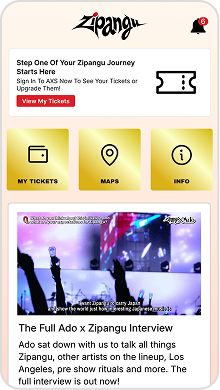
Step 1: Click on "My Tickets"
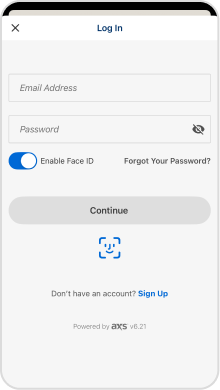
Step 2: Sign in to your AXS account
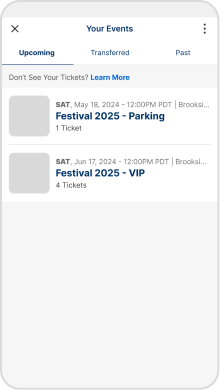
Step 3: View your tickets in the app
HOW TO TRANSFER TICKETS ON AXS:
If your group is arriving separately, you may transfer individual tickets through the Zipangu app.
Please note, the transfer option will be turned on within 72 hours of the event (or possibly sooner).
- Sign in to “My Tickets” using your AXS account in the app.
- Locate your Zipangu tickets in the upcoming event list.
- Click “Transfer”.
- Select the ticket(s) you would like to transfer.
- Select your contact or enter the recipient's first name, last name, and address.
- Click “Continue”.
- Review the information and click “Transfer”.
- PLEASE NOTE: If you have a VIP merch voucher or SVIP parking tickets, those will not be issued until 10am PT on the day of the event!
Make Your Game Plan For Zipangu
EVENT CHECKLIST:
- Plan how you’ll arrive at the show; arrive early to avoid traffic
- Download the Zipangu App
- Load your tickets into the app
- Review the bag policy & items you can and can’t bring into the show
- Review info on times & arrival policies
- Enjoy the show!
Event Location, Start & End
Event Location, Start & End
Parking opens at 2:00 PM. Venue gates open and event gates open at 3:30 PM. No overnight camping. No numbered wristbands will be issued.
Brookside at the Rose Bowl is located at 1001 Rose Bowl Dr, Pasadena, CA 91103.
Parking & Directions
Parking & Directions
Parking Lots open at 2:00 PM. Pre-Paid Parking is strongly recommended, and can be purchased via your AXS Account or on the AXS cart.
Carpooling is strongly encouraged. Explore the venue & parking maps and directions.
Shuttles & Rideshare
Shuttles & Rideshare
There is no longer a shuttle service provided for this event.
Parking will still be available at the Parsons lot on day of show for a $20 (Credit cards only) / day rate.
For anyone arriving in Old Town Pasadena, please walk via the Arroyo Seco Trail, Bus transit lines, or use a ride share service.
Metro
Metro
Fans heading to the Rose Bowl can connect to the Metro A Line and exit Memorial Park Station; then it’s just a short walk from Old Town Pasadena to the Rose Bowl Stadium and Brookside venue via the scenic Arroyo Seco trail.
Alternatively, take Pasadena Bus Transit Route 51 or 52 toward the Rose Bowl (buses run Monday–Saturday; check schedules).
Save time and buy roundtrip Metro fare on your way in (load $3.50 in Stored Value + $2 reusable TAP card per person). Be sure to tap your own card before each boarding!
To plan your trip on your phone or computer, popular and easy tools include Google Maps, Apple Maps, the Transit app, the Moovit app and metro.net.
TAP Pro Tip: Save time and skip the line! Download the TAP app or load your TAP card with roundtrip fare before the event and avoid long lines at TAP vending machines after the event.
Event Clear Bag Policy
Event Clear Bag Policy
Pack clear & pack light! Bring your items in approved clear bags no larger than 12” x 6” x 12”.
What to Bring, What to Leave
What to Bring, What to Leave
Take a second to review what you can bring in so you don’t have to forfeit any items when you arrive.
FAQs
FAQs
Still have questions? Check out our FAQ page for more details questions and answers.
Lockers
Lockers
Be prepared! Plan ahead by reserving a locker today. Lockers keep your valuables safe, merch secure, and your sweatshirt nearby for when it gets chilly.
Accessibility & ADA
Accessibility & ADA
This event welcomes all people with disabilities. Learn about eligibility and find info about our Accessibility Services.
Map Out Your Day When You Arrive
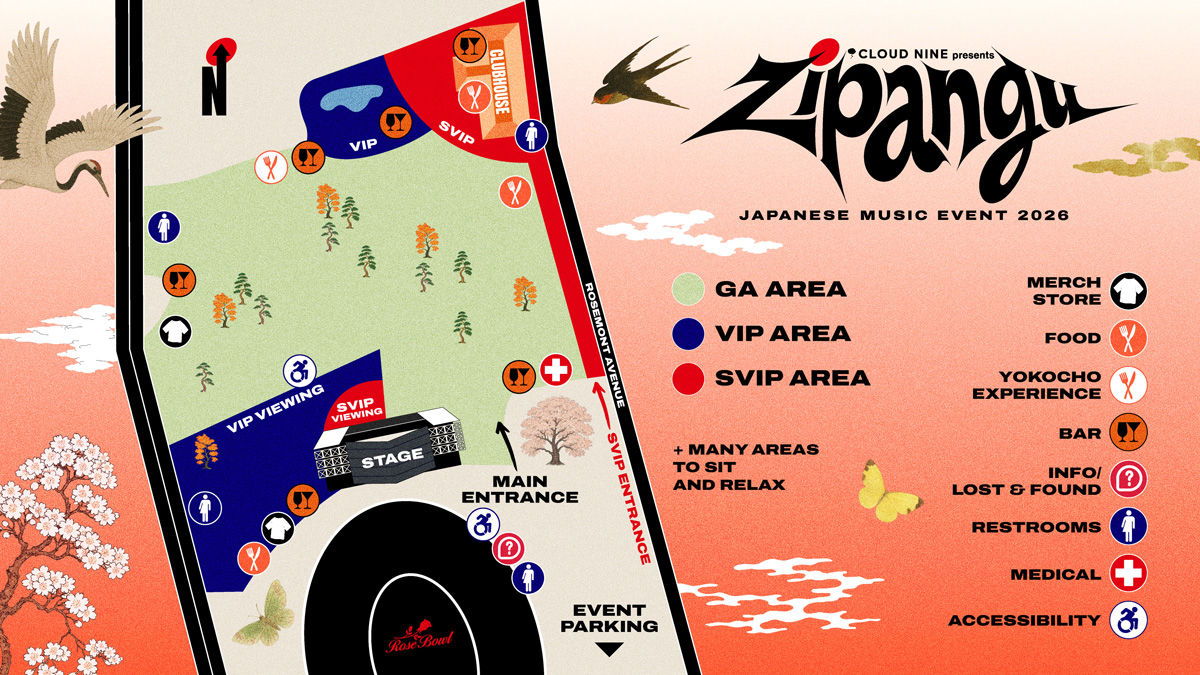
EXPLORE EVENT MAP
View the event, parking, and ADA maps to familiarize yourself so you know how to quickly get around. Remember, plan ahead and arrive early! There is so much to see and do starting at 3:30 PM.
Yokocho Experience
Yokocho Experience
A taste of Japan appears at Zipangu — welcome to “Yokocho,” where a vibrant world of Japanese street food and drinks comes to life. Explore where the Yokocho Experience will be along with other key details of our event site.
Cashless
Cashless
We are a cashless event. Accepted credit card payments include any US-issued and most internationally-issued magstripe or chip cards bearing a Visa, Mastercard, American Express, Discover, JCB or Union Pay logo. Contactless payments are also accepted. Locations where you can convert cash to a pre-paid Visa card will be available.
Maps
Maps
Get a first look at the venue layout below! Check back in closer to the show for a full, detailed map of the on site.
The best place to view the map is in the Zipangu app.
Lost & Found
Lost & Found
View items online anytime here or visit the Information Tent next to Gate N for assistance during show hours.
If you see your item listed, submit a claim with details that'll confirm ownership, and after your claim is matched, we’ll let you know how to get your item back. Shipping options are available, too.
If you don’t see your item, we recommend filling out a Loss Report, and if you believe your item was stolen, we recommend filling out a crime report with the Pasadena Police Department here
Merch
Merch
Zipangu 2026 merchandise has arrived! Preorder select items now through the link. Select items are only available at the show.
VIP & SVIP Merch Pick Up
VIP & SVIP Merch Pick Up
If you bought a VIP or SVIP ticket, your exclusive merch will be available for pick up during Zipangu at the main merchandise tent. Items will not be shipped so make sure you grab yours through the dedicated lane!
The QR code to scan for your merch pick up will be available in your Fan Account on the day of show.
DID YOU REMEMBER TO:
- Download the Zipangu App?
- Load your tickets into the app?
- Plan how you’ll get to the event and arrival time (arrive early!)?
- Review items you can and can’t bring into the event & event bag policy?
- Review the Getting Here page for arrival info?